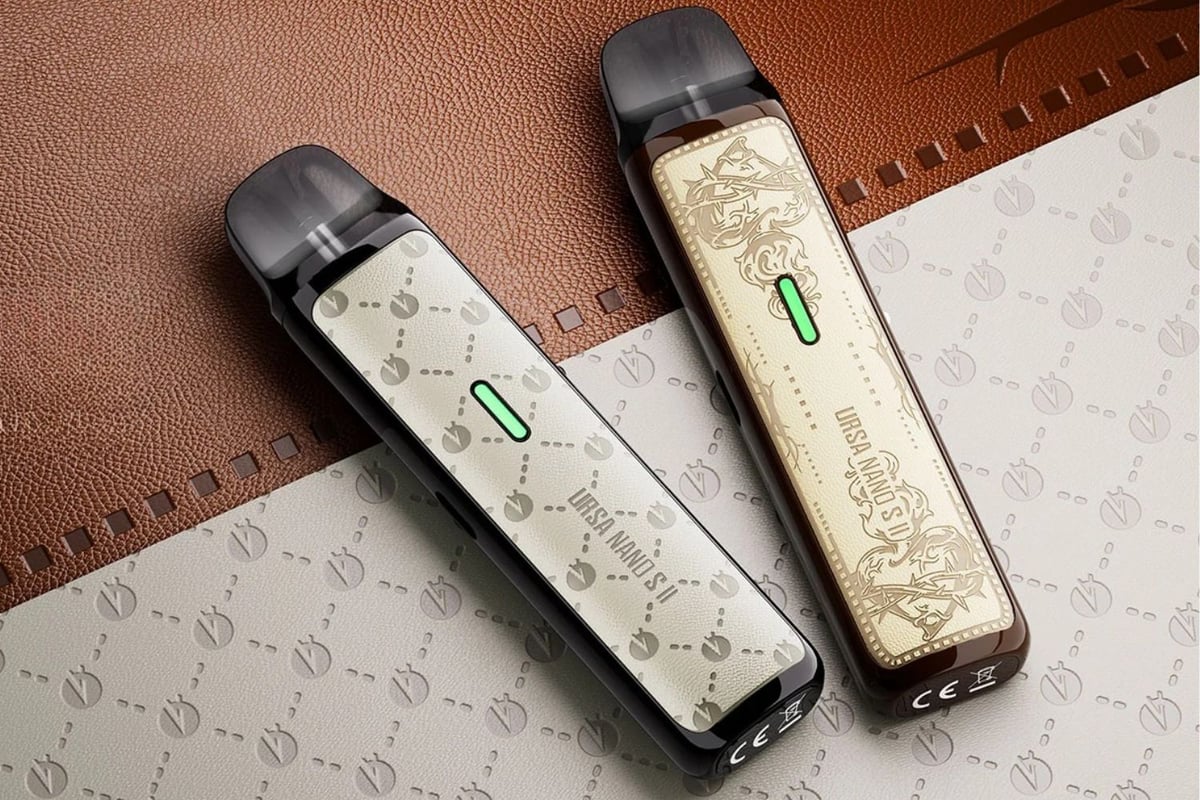
Ursa Nano S2
A leather-wrapped pod kit with up to 30W output and a 1000mAh battery, suited to vapers who want MTL or RDL performance in a compact, refined device.
Buy this device
Ursa Nano S2
Set up guide & tips
What's in the box
The Ursa Nano S2 ships with the device, a pre-installed 0.8Ω Ursa Cartridge V2 pod, a USB-C charging cable, and documentation. Check the pod is firmly seated before your first draw.
Filling the pod
Open the silicone tab on the side of the pod, fill with your chosen e-liquid, and press the tab firmly closed. You do not need to remove the pod from the device to fill it, as the side-fill port sits high enough to access with the pod in place.
Important: before vaping a brand new pod, leave it to soak for at least 5 minutes after filling. This allows the e-liquid to saturate the built-in mesh coil fully and prevents a dry, burnt hit on your first draw.
Pod capacity and TPD compliance
The Ursa Nano S2 pod has a 2.5ml total capacity, but UK TPD regulations cap the legal refillable volume at 2ml. You will notice the pod fills to 2ml in normal use, which is fully compliant for sale and use in the UK.
Which e-liquid to use
The right e-liquid depends on which pod resistance you are running.
- 0.6Ω pod (RDL, 16-25W recommended): use a higher-VG liquid, a 70/30 VG/PG ratio works well here. Freebase nicotine at 3mg or 6mg suits the airier, warmer draw. Nic salt works too, but keep it to 10mg or under at this output.
- 0.8Ω pod (MTL/RDL crossover, 12-17W recommended): a 50/50 VG/PG e-liquid is the sweet spot. Nic salts up to 20mg or freebase at 6mg both work comfortably.
- 1.0Ω pod (MTL, 9-13W recommended): this is the tightest draw of the three. Higher-PG 50/50 liquids or nic salts up to 20mg give you the closest feel to a cigarette draw with clean, defined flavour.
Never exceed 20mg/ml nicotine in any configuration, in line with UK TPD rules.
Adjusting airflow
The Ursa Nano S2 has a side-mounted airflow slider. Open it fully for a looser RDL draw, close it down for a tighter MTL experience. Pair the airflow setting with the appropriate pod resistance for best results.
Charging
Charge via the USB-C port. The device accepts 5V/1A as standard and supports a 5V/2A charger for a faster top-up. The LED indicator on the device shows battery level during use and charging status as it fills.
Battery LED during use:
- Red light: battery below 3.7V, charge soon
- Yellow light: battery between 3.7V and 3.9V
- Green light: battery above 3.9V
Charging complete: the LED stays green (solid) when the battery reaches approximately 4.2V and is fully charged.
Warning alerts (all lights flash):
- 3 flashes: short-circuit, open circuit, low resistance, or high resistance detected
- 5 flashes: voltage too low to fire
- 8 flashes: overtime protection triggered (draw too long)
- All lights stay on solid during charging: overcharge protection has activated, disconnect and check your charger
Specifications
| Specification | Value |
|---|---|
| Size | 24.4×15.4×107.8mm |
| Capacity | 2.5ml/2ml |
| Output Power | 9W-30W |
| Output Voltage | 3.3V-4.2V |
| Battery Type | 1000mAh (built-in) |
| Charging | 5V/1A, Support 5V/2A Charger |
| Resistance Range | 0.6, 0.8 and 1.0 Ohm |
User manual
Open the official Ursa Nano S2 manual (PDF) in a new tab.
Download PDFFrequently asked questions
What pods are compatible with the Ursa Nano S2?
The Ursa Nano S2 is compatible with the Ursa Cartridge V2, available in 0.6Ω, 0.8Ω, and 1.0Ω resistances. These are the same pods used across several devices in the Lost Vape Ursa range, so they are straightforward to find as replacements.
What is the difference between the 0.6Ω, 0.8Ω, and 1.0Ω pods?
The 0.6Ω pod gives an airier RDL draw and suits freebase nicotine at higher VG ratios. The 0.8Ω sits in the middle, good for 50/50 liquids with either freebase or nic salts. The 1.0Ω delivers the tightest MTL draw, closest to a cigarette, and pairs best with nic salts.
How do I know when to replace my Ursa Nano S2 pod?
Expect a pod to last roughly one to two weeks with regular use, but flavour is the real indicator. When taste becomes muted, slightly burnt, or noticeably different from fresh, the built-in mesh coil is spent. Continuing past that point will not damage the device, but the experience drops off quickly.
Can I use nic salts in the Ursa Nano S2?
Yes. Nic salts work well in the Ursa Nano S2, particularly in the 0.8Ω and 1.0Ω pods at MTL or restricted settings. Keep nicotine strength at or below 20mg/ml, which is the legal UK limit. At the 0.6Ω setting, a lower strength salt (10mg or under) is more comfortable given the warmer output.
Why is my Ursa Nano S2 flashing all lights three times?
Three flashes across all LEDs indicates one of four protection modes: short-circuit, open circuit, low resistance, or high resistance. Remove the pod, check the contacts on both the pod and the device for any residue or liquid, reseat the pod firmly, and try again. If the problem persists, try a different pod to rule out a faulty cartridge.
How long does the 1000mAh battery last on a full charge?
Battery life depends on your wattage and how heavily you vape. At lower MTL settings around 9-13W, a full charge comfortably covers a day of moderate use. Running the 0.6Ω pod closer to 25-30W will drain the battery faster, so keeping the USB-C cable handy for an afternoon top-up is sensible.